
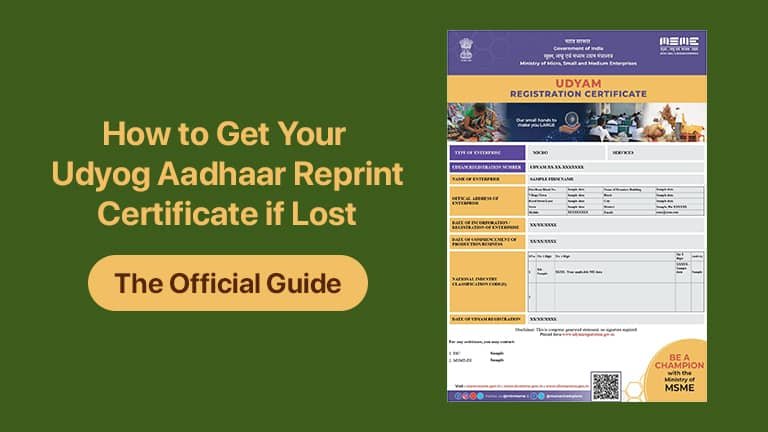
Losing an important document like your business registration certificate can feel like a setback, especially when you need it urgently for a loan application, government tender, or official verification. If you have misplaced your old Udyog Aadhaar reprint certificate and are wondering how to obtain a fresh copy, you are in the right place.
The good news is that the process to re-download Udyog Aadhaar is simple, digital, and free, managed entirely through the Ministry of MSME's official portal. While the Udyog Aadhaar Memorandum (UAM) system has been replaced by the newer Udyam Registration scheme, the government has ensured that all previously registered entities can still access and print MSME certificate copies, including the underlying UAM details, with minimal hassle.
This comprehensive guide will walk you through the essential steps, necessary prerequisites, and the critical importance of keeping a current copy of your registration status on hand. We aim to ensure you can quickly retrieve your duplicate Udyog Aadhaar certificate and maintain continuous access to the benefits provided to Micro, Small, and Medium Enterprises (MSMEs).
The Transition: Understanding Udyog Aadhaar in the Udyam Era
Before diving into the steps for the Udyog Aadhaar reprint certificate, it is vital to understand the context of the current MSME framework.
The Udyog Aadhaar Memorandum (UAM) system, which provided a 12-digit Udyog Aadhaar Number (UAN), was the government’s registration platform for MSMEs until June 30, 2020. Effective from July 1, 2020, the government introduced the Udyam Registration system, which provides a new 19-digit Udyam Registration Number (URN).
This transition was based on revised classification criteria for MSMEs (Micro, Small, and Medium Enterprises) based on investment and annual turnover. Crucially, the Ministry of MSME mandated that all existing UAM holders should migrate or re-register under the Udyam system to retain their official MSME status and continue availing government benefits.
What This Means for Your Lost Certificate:
- 1. If you migrated: If you completed the migration to Udyam, your Udyog Aadhaar data is now linked to your Udyam Registration Number. You will essentially download the Udyam Certificate, which acts as the updated print MSME certificate, but it will contain an annexure or reference to your original Udyog Aadhaar details.
- 2. If you did not migrate: While all MSMEs were strongly encouraged to migrate, the system still allows for the retrieval of old Udyog Aadhaar data through the Udyam portal's verification mechanism, as the data was generally transitioned into the new system’s database.
The process of reprinting or obtaining a duplicate copy, therefore, primarily takes place on the official Udyam Registration Portal.
Section 1: Step-by-Step Guide to Re-download Udyog Aadhaar
Whether you need to re-download Udyog Aadhaar details or the latest Udyam Certificate that replaced it, the process is streamlined and relies on a single window. Follow these steps carefully to secure your Udyog Aadhaar reprint certificate:
Step 1: Access the Official Udyam Registration Portal
The first and most critical step is to navigate to the official Udyam Registration portal (Govt. of India, Ministry of MSME). Avoid unofficial third-party websites that charge fees for printing services, as the official government process is entirely free.
Step 2: Navigate to the Print/Verification Section
On the homepage of the official portal, look for the navigation menu (often located at the top). You will find an option labeled "Print/Verify" or similar. From the dropdown menu, select the option that reads "Print Udyam Certificate".
Step 3: Log in Using Your Registration Number and OTP
You will be directed to a login page where the system verifies your identity. Here, you will need to input one of the following:
- ● Your Udyam Registration Number (URN): (Recommended, if you have migrated). This 19-digit number starts with 'UDYAM-XX-00-XXXXXXX'.
- ● Your Udyog Aadhaar Number (UAN): If you only have your old 12-digit UAN, the portal may prompt you to use the "Print Udyam Certificate" link or a similar verification path, allowing you to enter your old UAN to retrieve the updated information.
Alongside the registration number, you must enter the Mobile Number that was originally registered with either your Udyog Aadhaar or your subsequent Udyam Registration.
Step 4: Validate and Generate OTP
After entering your number and the registered mobile number, you must select the preferred mode for receiving the One-Time Password (OTP), usually via Mobile or Email. Click on "Validate & Generate OTP."
Step 5: Enter OTP and Access the Certificate
Input the OTP received on your registered phone or email ID. Once the OTP is validated, the system will log you in and display your official MSME registration data.
Step 6: Print MSME Certificate (Including UAM Annexure)
This is the final and most important step to secure your Udyog Aadhaar reprint certificate. On the page displaying your details, you will see options for printing. Look for the following choices:
- ● Print Certificate: This will provide you with the latest Udyam Certificate.
- ● Print with Annexure: This is the option you must choose. Selecting "Print with Annexure" ensures that the downloaded document includes the annexure containing the full details of your original Udyog Aadhaar Memorandum (UAM) application. This comprehensive document serves as the official duplicate Udyog Aadhaar certificate and is accepted everywhere.
You can then save the file as a PDF on your device and take a physical print MSME certificate copy whenever required.
Section 2: What If I Have Lost My Udyog Aadhaar Number (UAN) Too?
A common issue enterprises face when trying to re-download Udyog Aadhaar is that they have lost the actual UAN/URN itself, not just the physical certificate. Fortunately, the official portal provides a recovery mechanism to ensure you can still retrieve your certificate.
To recover your UAN/URN:
- 1. Visit the Udyam Registration Portal.
- 2. Navigate to the "Print/Verify" drop-down menu.
- 3. Select the "Forgot Udyam/UAM No." option.
- 4. You will be prompted to select the registration type (Udyam or Udyog Aadhaar). Select Udyog Aadhaar if you know you only registered under the old system.
- 5. Enter the registered mobile number or email ID used during the initial Udyog Aadhaar registration.
- 6. Generate and validate the OTP.
- 7. Upon successful validation, your Udyam Registration Number (URN) or your old UAM Number will be sent to your registered contact details.
Once you have successfully recovered your number, you can go back to Step 1 in Section 1 and proceed to print MSME certificate using the validated credentials. This two-step process—recovery followed by printing—ensures that even a completely lost registration can be retrieved.
Section 3: Why You Must Secure a Duplicate Udyog Aadhaar Certificate
The effort to obtain a duplicate Udyog Aadhaar certificate (or its Udyam equivalent) is well worth it, as this document is the foundation for various crucial business advantages in India. Your official MSME status provides tangible benefits that directly impact your company’s growth and financial stability:
1. Access to Priority Sector Lending (PSL)
Banks and financial institutions are mandated by the Reserve Bank of India (RBI) to prioritize lending to MSMEs. Possessing the latest certificate, whether UAM or Udyam, facilitates easier access to credit, often at concessional interest rates, and can help secure collateral-free loans under schemes like the Credit Guarantee Fund Trust for Micro and Small Enterprises (CGTMSE). For many businesses, the certificate is the key to unlocking affordable finance.
2. Protection Against Delayed Payments
One of the most valuable benefits provided by the Ministry of MSME is protection against payment delays from buyers (especially government departments and large corporations). Under the MSME Development Act, 2006, registered enterprises have the right to claim interest on delayed payments. Your official Udyog Aadhaar reprint certificate is the non-negotiable proof required to avail of this legal protection through the MSME Samadhaan portal.
3. Eligibility for Government Schemes and Subsidies
A valid print MSME certificate is the primary qualification document for numerous central and state government schemes. These include subsidies for technological upgrades, financial support for participating in international trade fairs, concessions on patent and trademark registration fees, and benefits under schemes designed for infrastructure development and skill enhancement.
4. Tax and Regulatory Exemptions
MSMEs often enjoy various tax exemptions, rebates, and easier compliance processes compared to larger firms. Furthermore, in specific state jurisdictions, registration can lead to exemptions from Stamp Duty and Registration Fees, providing significant savings at the time of business registration or property purchase.
By ensuring you have a current duplicate Udyog Aadhaar certificate that reflects your enterprise’s MSME status, you keep your business compliant and competitive.
Section 4: Key Details to Ensure a Successful Reprint
To ensure a smooth process when you re-download Udyog Aadhaar or your Udyam Certificate, keep the following critical pieces of information accurate and accessible:
- •The Registration Number: Have your UAN (Udyog Aadhaar Number) or URN (Udyam Registration Number) ready. The system relies on this unique identifier.
- •The Registered Mobile Number/Email: Access to the contact details used during the original registration is mandatory for OTP verification. If these details have changed, you must first update them on the Udyam portal before attempting to print the certificate.
- •A Reliable Internet Connection: Since the entire process is online and culminates in a PDF download, ensure you have a stable connection to successfully save the document.
- •Official Portal Use Only: We reiterate the importance of using the official government portal (udyamregistration.gov.in) to prevent data leakage and unnecessary service charges. The retrieval and Udyog Aadhaar reprint certificate process is designated as a free-of-cost service by the government.
Conclusion: Ensuring Perpetual Access to Your Official Document
The Udyog Aadhaar reprint certificate is more than just a piece of paper; it is your enterprise’s official recognition under the Ministry of MSME. While the platform has evolved from Udyog Aadhaar to Udyam Registration, the accessibility of your data remains a government priority.
By following the simple, official steps outlined above—accessing the Udyam portal, using your registration number, validating via OTP, and crucially, selecting the "Print with Annexure" option—you can swiftly re-download Udyog Aadhaar details linked to your new Udyam profile.
Do not let a misplaced certificate prevent your business from availing critical government benefits. Secure your duplicate Udyog Aadhaar certificate today, save multiple digital backups, and ensure your enterprise is always ready to prove its vital status as a Micro, Small, or Medium Enterprise. Your journey to growth depends on it.